Out of the house first
We moved an established Home Assistant out of a Swedish house and onto hosted infrastructure while the house kept heating itself. 83 of 101 integrations came back — and the 18 that didn't sorted into a pattern worth knowing.
Updated 19 August 2026 migrationhome-assistantnetworkinghomelink
GamlaBio runs a Swedish house: heating, lighting, a boiler, presence detection, a media library. 1,410 entities, 96 automations, years of accumulated logic — some of it carried through more than one house move.
It needed to move off an installation type Home Assistant no longer supports. The usual answer is an afternoon of downtime and hoping you remember how it was all set up. We did something more awkward on purpose: out of the house first, onto a hosted VM, before bringing it home again later. That is the path someone escaping ageing hardware actually walks, and it puts every assumption about "the brain can reach the devices" under maximum stress.
Before anything moved
Every migration begins with a question nobody enjoys: is this actually going to work? The importer answers it before touching anything — reading the archive and comparing it against the target machine.
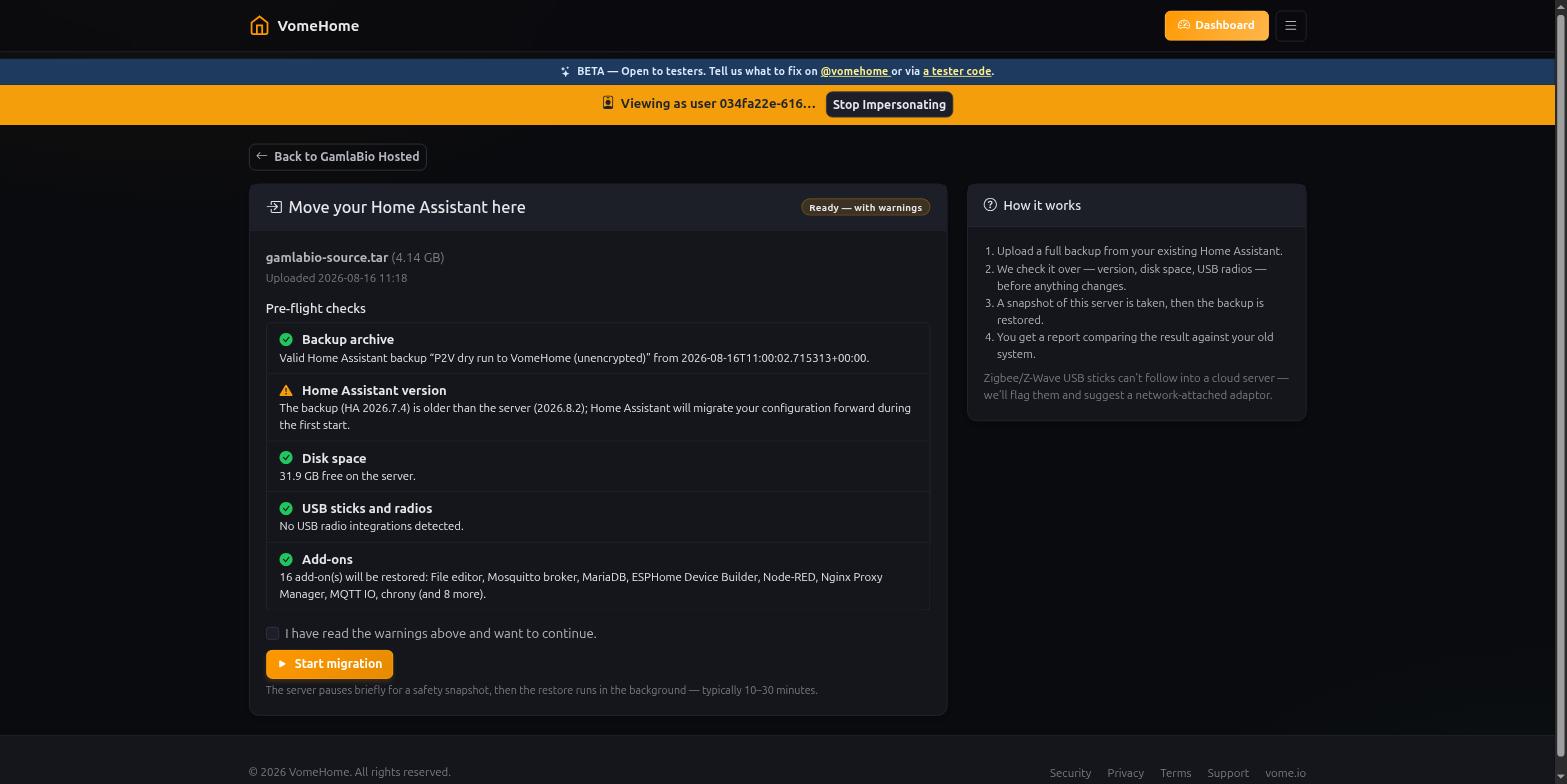
It immediately blocked the migration for lack of disk — on a server with 31.9 GB free. Home Assistant reports disk in gigabytes; our code divided by 1024 as though megabytes, so every figure rounded to 0.0. The unit test had encoded the bug, feeding it numbers Home Assistant never sends.
That is the first of twenty-five, and the pattern starts there. We fixed the units, pre-flight went from BLOCKED to a warning on the same backup and the same server, and the migration could start.
Three attempts
It did not work first time. Or second.
The first restore reported that Home Assistant never came back. It had. The snapshot was taken, the archive copied, the restore ran, and Home Assistant came up perfectly — while our code sat watching for a health value that nothing in the system has ever produced. It waited out its full thirty minutes and declared a success a failure. Worse, it then offered to roll the machine back, which would have destroyed half an hour of work that had gone right.
The second attempt got further and failed differently. After the snapshot, the four-gigabyte copy and the upload had all completed, Home Assistant refused the restore: "216d3222 is only a partial backup!" A backup becomes "partial" the moment you deselect anything, and we had deliberately dropped two unused Z-Wave add-ons when taking it. The importer only ever asked for a full restore. That fact is written in plaintext inside the archive and could have been checked before a single byte moved.
The third worked. Home Assistant restarted on the version the backup carried, and the verification report ran itself.
Both failures were ours, both were the same kind of mistake — code that had been read but never run — and both are now impossible: the health check tests the value the system actually emits, and a partial backup is restored as a partial backup, with pre-flight saying so up front.
What came back
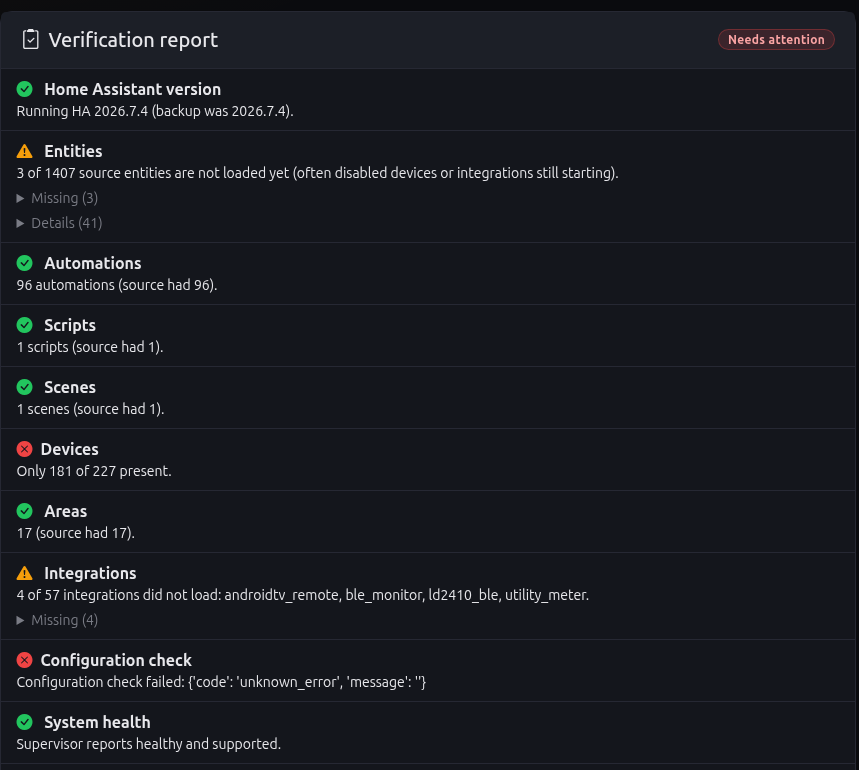
83 of 101 integrations loaded. All ten ESPHome devices connected — from a datacentre to boards in a Swedish house — along with MQTT, Matter's own entry and nine Bluetooth proxies. Automations 96 of 96. Areas 17 of 17.
The 18 that did not load sorted into three groups, and the shape of that split is the useful part:
| Class | Result | Why |
|---|---|---|
| Talking to a known address | Works | ESPHome, MQTT, Bluetooth proxies |
| Relying on discovery | Cannot work | broadcasts are designed never to leave your network |
| Cloud services | Needs re-auth | the restore replaces stored credentials |
The bit that cannot be fixed by a faster connection
Device discovery works by broadcasting a question to everything on the local network and listening for replies. Those broadcasts are designed never to leave the network they were sent on — routers must not pass them along. A Home Assistant that is not on the same network segment will never hear them, however good the link between them is.
The fix is not a faster tunnel. It is to stop the connection behaving like a road between two places and make it behave like a cable: extend the home network itself, so both ends share one broadcast domain. Within minutes of doing that, the hosted machine was receiving the house's own router advertisements and its Google speakers announcing themselves.
Two that are worth the detour
A restore that reported failure while succeeding
The first restore said Home Assistant never came back. An overnight rehearsal of that single step told a different story: **178 polls over 1,806 seconds, every one of them seeing a healthy Home Assistant answering HTTP 200** — and the function returned false anyway. It tested a health value against `'serving'`, `'running'` or `'ok'`. Nothing in the codebase emits any of those; the real vocabulary is `'healthy'`. The comparison had never once been true. It shipped because every test mocked the function out, so the real one had never run. Worse than the bug: the page then offered a rollback that would have destroyed thirty minutes of successful work.Three theories about a slow build, two of them wrong
Builds took sixteen minutes, and the test timings showed a flat ~4.2 second floor across 159 tests. First suspect: database rebuilds. Second: coverage instrumentation. A faithful replica — clean checkout, the pipeline's own environment, same flags, same machine — ran those tests in **17 seconds**, killing both theories. The answer was in the console header all along: the workspace was named `portal-ci@2`. Every push started **two identical builds of the same commit**, which then fought over one machine. A flat per-test tax is contention, not work. Genuinely slow code has a shape; a uniform floor does not.What it cost us
Twenty-five problems were logged, most of them self-inflicted, and one pattern runs through nearly all of them: code that had been read but never run.
A restore that reported failure while quietly succeeding — it compared a status against three values nothing in the codebase ever emits, and every test had mocked the function out, so the real one had never executed. A retry button that returned an error on its first real click, "tested" by asserting its address appeared in a template. A network profile in every template we ship that was bound to nothing at all, which nobody had noticed because no VM had ever had two network cards.
We found all of it on our own house, before anyone else was on it. That is the entire argument for migrating yourself first.
Next time
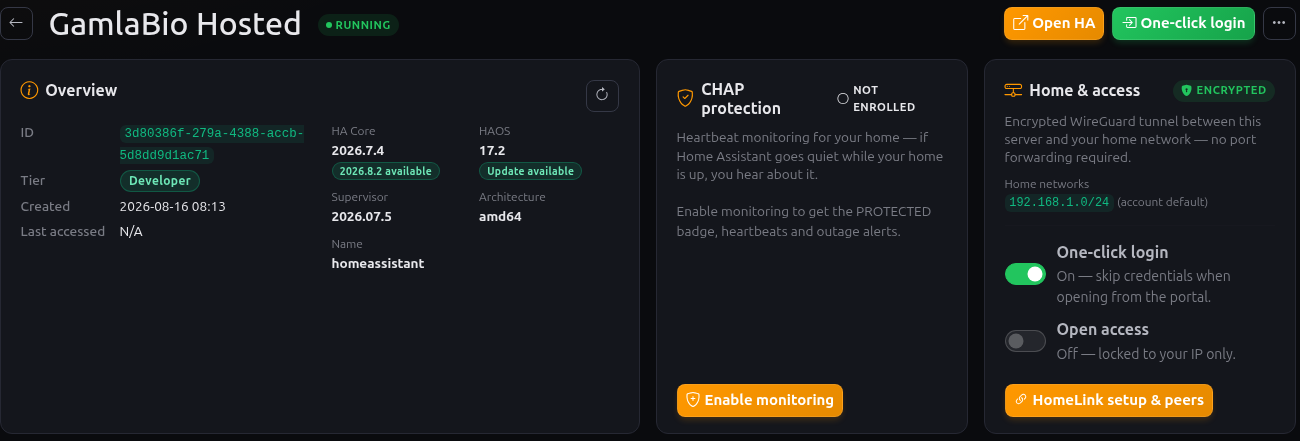
The harder half is bringing it home again — onto fresh hardware with no downtime at all, using failover rather than a maintenance window. Everything above was, in a sense, the rehearsal.
What actually came next was one IKEA bulb that would not pair over Thread, on this same hosted instance. That is a three-part series of its own, starting with A bulb that would not join.
Fancy trying it?
VomeHome hosts Home Assistant properly: your own instance, backed up, monitored, and connected to the devices in your house over an encrypted tunnel with no ports opened on your router. If you already run Home Assistant, the import above is the same one you would use — pre-flight checks first, a rollback point taken before anything changes, and a report at the end telling you exactly what came across.
Take a look at VomeHome — it is open to testers, and we would rather hear what breaks than be told it is fine.